

Intelligent automation combines artificial intelligence with workflow software and robotic process automation to run whole business processes with less manual work. This guide explains what intelligent automation is in simple words, how its three parts work together, how it differs from RPA, seven real examples from invoices to customer support, and the benefits, risks, and a simple way for a small business to start. It builds on our guides to artificial intelligence, the different types of AI, and what AI is used for, so you can see exactly where this idea fits in the wider AI picture.
Intelligent automation sounds complicated, but the idea is simple. It is what happens when a business lets AI read and understand work, lets workflow software organize that work, and lets software robots carry out the repeatable steps. The result is a process that runs from start to finish, with people stepping in only where judgment is needed.
Many businesses already use intelligent automation without calling it by that name. An invoice that is read, checked, and paid without anyone retyping it, or a customer email that is sorted and answered in minutes, are both everyday examples. This guide explains the idea in plain words, shows how it works, compares it with RPA and plain AI, and gives seven real examples you can recognize from daily business life.
What Is Intelligent Automation?
Intelligent automation is software that runs a whole business task for you, from start to finish. It reads documents, makes simple decisions, and does the routine work, so people only need to handle the tricky cases.
IBM defines intelligent automation as the use of automation technologies — artificial intelligence (AI), business process management (BPM), and robotic process automation (RPA) — to streamline and scale decision-making across organizations. It is sometimes also called cognitive automation. In plain words: it is a way to run a business process from start to finish using three tools together. AI does the thinking part — reading documents, understanding language, and making routine decisions. Workflow software (BPM) organizes the steps and decides who or what handles each one. RPA bots do the clicking, copying, and form-filling inside existing software.
Three things it is not: it is not a single robot or a single app. It is not just a chatbot. And it is not magic — it still needs clear rules, good data, and people to handle the cases that do not fit the pattern. When those pieces are in place, a process that used to take hours of manual work can run in minutes, with a person checking only the exceptions.
The 3 Main Parts of Intelligent Automation
IA has three parts, and each one does a different job. IBM describes the same three components, and most vendors use the same split. Understanding the three parts is the fastest way to understand the whole idea.
1. Artificial Intelligence (AI): The Decision Engine
AI is the part that understands. It reads unstructured information — emails, PDFs, scanned invoices, photos, chat messages — and turns it into structured data a computer can act on. Machine learning models learn from past examples: which invoices were approved, which emails were urgent, which claims were valid. Natural language processing (NLP) reads and classifies text. Computer vision reads images and screens. This is the ‘intelligent’ part of the name, and it is what lets automation handle work that has no fixed format.
If you want the background, our guide to the different types of AI explains narrow AI, machine learning, and the other types this technology relies on. The AI inside IA is almost always narrow AI — built for one job, not general thinking. Our article on what a neural network is explains the model type that powers much of this reading and classifying work. Generative AI often does the drafting inside these workflows — see What Is Generative AI? Tasks and Examples for Beginners.
2. Business Process Management (BPM): The Organizer
BPM, also called workflow automation, is the part that organizes. It holds the map of the whole process: step one, step two, who approves what, what happens when something is missing, and where the process ends. Without it, you would have clever tools doing isolated tasks with nobody coordinating them. With it, an invoice moves from inbox to approval to payment in the right order, every time, and every step is logged so the business can see where work gets stuck.
3. Robotic Process Automation (RPA): The Hands
RPA bots are software robots that do the repeatable digital work: opening an application, copying data from one screen to another, filling in a form, moving a file, or generating a report. They follow fixed rules and they do not get tired. Their limit is that they cannot read a messy document or make a judgment call on their own. That is exactly why they are paired with AI in IA — the AI reads and decides, and the bot carries out the decision.
How Intelligent Automation Works, Step by Step
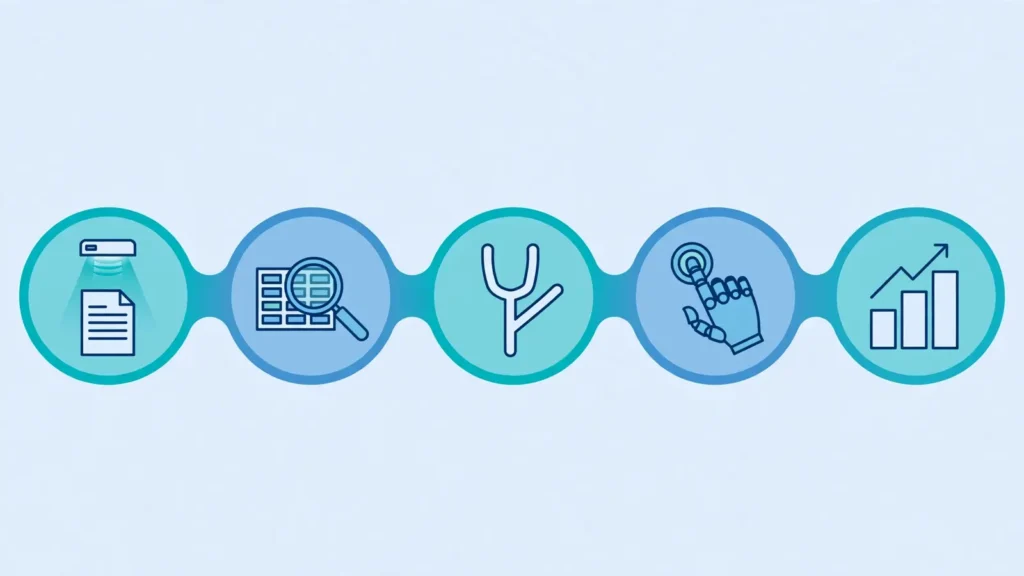
A typical IA process runs in five steps. The example below follows one invoice, but the same pattern fits almost any process. Step 1: Capture. Work arrives — an emailed invoice, a web form, a scanned letter, a chat message. The system collects it instead of a person opening each item by hand. Step 2: Read and understand. AI reads the document. Intelligent document processing pulls out the vendor name, date, amount, and due date, even if the invoice layout changes. NLP classifies the message: is this a new order, a complaint, or a question about a bill?
Step 3: Decide. Rules and machine learning models decide the routine cases. Does this invoice match a purchase order? Is the amount under the approval limit? If yes, it moves on automatically. If something does not match, the case goes to a person. Step 4: Act. RPA bots or system integrations carry out the decision: enter the data in the accounting software, schedule the payment, send the confirmation email, update the customer record.
Step 5: Learn and improve. The system logs every step, including the exceptions people handled. Over time, the models get better at the routine cases, and managers can see which steps are slow or error-prone. This feedback loop is what separates IA from a one-time script — the process keeps improving instead of freezing in place. You can see how the learning part works in our explainer on how neural networks learn.
Intelligent Automation vs RPA: What Is the Difference?
This is the most common confusion, so it deserves a clear answer. RPA is one tool. Intelligent automation is the combination of tools that includes RPA. A process can use RPA without AI, and many businesses do. But RPA alone can only follow fixed steps on clean, structured data.
What it handles: RPA alone — fixed, repeatable steps with clear rules. Intelligent automation — fixed steps plus reading, classifying, and routine decisions. Input it can read: RPA alone — structured data in screens and files. Intelligent automation — structured and unstructured data: PDFs, scans, emails, images. Decisions: RPA alone — rules only. Intelligent automation — rules plus predictions and classification. When it stops: RPA alone — any exception or change in format. Intelligent automation — only genuinely ambiguous or high-risk cases go to a person. Best for: RPA alone — copying data, filling forms, moving files. Intelligent automation — whole processes such as invoice-to-payment or claim handling.
UiPath puts it this way: IA applies AI and related technologies — computer vision, cognitive automation, and machine learning — to RPA, so robots can handle work that used to need a person to read or judge. A simple test: if the work always looks the same and the rule never changes, RPA alone is enough. If the work arrives in different formats, needs reading, or needs a small decision, that is where IA earns its name.

Intelligent Automation vs Artificial Intelligence
AI is a technology. Intelligent automation is a way of using that technology inside business processes. AI on its own can write text, recognize an image, or predict a number. IA takes those abilities, adds workflow organization and RPA bots, and turns them into a finished process that runs without constant human input. Think of it like this: AI is the engine, and IA is the whole car — engine plus steering, brakes, and a route.
A company that buys an AI tool has not automated a process yet. It has automated it when the AI’s output flows into the next step, the next system, and the final result without someone carrying the work between tools by hand. If you want the wider picture first, start with our pillar guide to artificial intelligence, which explains what AI is, how it works, and where it is used.
7 Real Examples of Intelligent Automation for Beginners
1. Invoice Processing
A supplier emails a PDF invoice. IA reads the vendor, amount, and due date, matches it against the purchase order, and flags only the invoices that do not match. Matching invoices go to payment automatically. This is the most common first IA project because invoices are high-volume, rule-based, and painful to do by hand.
2. Customer Email Triage and Replies
A support inbox receives hundreds of emails a day. IA classifies each one — order question, refund request, complaint, or sales inquiry — and routes it to the right team. For common questions it drafts a reply from the company’s knowledge base, and an agent approves or edits it before sending. Customers get faster answers, and agents spend their time on the hard cases.
3. Employee Onboarding
A new hire accepts an offer. IA creates their accounts, sends the paperwork, collects the signed forms, orders equipment, and schedules training — each step triggered by the previous one. HR staff stop chasing forms and instead welcome the new employee. The same flow works in reverse when someone leaves, removing access in the right order.
4. Insurance Claims
A customer files a claim with photos and a description. IA reads the documents, checks the policy, estimates the straightforward cases, and sends the complex ones to an adjuster. IBM notes that insurance is one of the industries where IA can nearly remove manual rate and payment calculations and simplify claims paperwork.
5. Healthcare Appointments and Patient Intake
A patient books an appointment online or by message. IA reads the request, matches it with the right clinic and time, sends reminders, and collects intake forms before the visit. In remote care, chatbots handle the first questions and pass a summary to the clinician. Staff spend less time on phones and forms, and patients wait less.
6. Online Store Orders and Inventory
A small online shop receives an order. IA confirms payment, checks stock, tells the warehouse what to pack, updates the inventory count, and emails the tracking link. If an item is out of stock, it flags the order for the owner instead of failing silently. For a one-person or small-team shop, this is often the difference between growing and drowning in admin.
7. Loan Application Document Checks
A bank receives a loan application with pay slips, ID documents, and bank statements. IA reads each document, checks that nothing is missing, verifies the numbers against the application, and prepares a summary for the loan officer. The officer still makes the lending decision — the automation does the reading and checking that used to take hours.
Benefits of Intelligent Automation
- Time saved on routine work. Staff stop retyping data and chasing paper. That time goes to customers, sales, or solving problems that need a human.
- Fewer errors. A bot copies numbers exactly the same way every time. AI checks the reading against the rules before anything is filed or paid.
- Faster service. A process that took days can take hours or minutes, because work no longer waits in someone’s inbox overnight.
- Scale without hiring at the same rate. A business can handle more orders, claims, or emails with the same team, because the routine share of each case is automated.
- A clear record. Every step is logged, which makes audits and compliance checks easier — a point IBM highlights for regulated industries. These benefits explain what the purpose of AI is in practical terms: AI is useful not because it is clever, but because it removes routine work and leaves people the work that needs judgment.
Risks and Limitations of Intelligent Automation
- Bad data in, bad decisions out. If the documents or records are wrong, the AI will confidently process the wrong information. Clean data matters more than clever software.
- Over-automation. Some decisions should stay with people — refunds above a limit, medical judgments, lending decisions, anything with serious consequences. A good design always keeps a human review step for those cases.
- Setup cost and time. Mapping a process, connecting systems, and training models takes weeks, not hours. Small businesses should start with one small process, not the whole company at once.
- Security and privacy. Automated processes touch customer data, financial records, and personal information. Access controls, encryption, and clear rules about what the AI may read are part of the project, not an afterthought.
- Change and maintenance. Websites change, forms change, rules change. Bots and models need someone to maintain them, or they quietly break.
- Job changes. Routine roles shrink as routine work is automated. The honest answer is that the work changes rather than disappears: people move from doing the steps to checking the exceptions, improving the process, and handling customers. Businesses should plan that shift openly instead of pretending it will not happen.
Who Should Use It? Small Business vs Large Company
Large companies were the first users, because they have the volume and the budget. But the idea scales down well. The deciding factor is not company size — it is repetition. If a business repeats the same process dozens of times a week, IA can pay for itself. If a process happens twice a month, a simple checklist is cheaper. A small business should pick one process that is high-volume, rules-based, and painful — usually invoicing, order handling, or customer emails — and automate only that. A large company can run a program across departments, with a team that maps processes and measures results. Both should start small, prove the value on one process, and only then expand.

How to Start With Intelligent Automation: 5 Simple Steps
- Pick one small process. Choose something you do often, that follows clear steps, and that eats time — for example, processing supplier invoices or answering common customer emails.
- Write down the steps. Map the process on paper first: where work arrives, who decides what, what happens when something is wrong, and where it ends. If you cannot draw it, you cannot automate it.
- Clean the data. Check that the information the process needs is complete and consistent. Fix the source — the forms, the spreadsheet, the inbox — before buying any tool.
- Start with RPA plus one AI step. Automate the fixed steps first, then add one AI ability, such as reading invoices or classifying emails. Keep a human review step for exceptions from day one.
- Measure, then expand. Track time saved, errors, and how many cases needed a person. If the numbers improve, add the next process. If they do not, fix the process before automating more of it.
Intelligent Automation Tools and Platforms
Three names appear in nearly every serious guide, and they are worth knowing: UiPath — an automation platform built around RPA, with AI features for document understanding, computer vision, and, more recently, AI agents that plan multi-step work. Microsoft Power Automate — Microsoft’s workflow automation tool, widely used by businesses that already run on Microsoft 365. It connects common business apps and adds AI steps to flows. IBM Automation — IBM’s enterprise automation offering, built on the AI + BPM + RPA combination described in its intelligent automation guide. Choose based on what your business already uses, your budget, and the size of the first process — not on brand names. Check current pricing and features on the vendor’s own site before deciding, because both change often. A free trial on a single small process is a reasonable way to learn what a platform can actually do for your business.
The Future of Intelligent Automation
The direction is clear from what vendors are building now: automation is moving from fixed bots toward AI agents that can plan their own next step within limits a person sets. UiPath calls this agentic automation — agents, robots, and people working in one orchestrated workflow, with human review built in. IBM makes a related distinction: hyperautomation is the wider business program of automating as much as possible, and IA is often one part of that program.
For a beginner, the practical meaning is simple: the tools will keep getting better at reading messy input and handling variation, but the human parts — setting the rules, checking the exceptions, and owning the decisions — are not going away. The businesses that benefit most will be the ones that learn the process first and the tool second.
FAQs
What is intelligent automation in simple words?
It is a way to run a whole business process using three tools together: AI reads and understands the work, workflow software organizes the steps, and software robots carry out the repeatable actions. People handle only the cases that need judgment.
What is the difference between RPA and intelligent automation?
RPA is one tool that follows fixed rules on clean, structured data. Intelligent automation combines RPA with AI and workflow software, so it can also read messy documents, classify messages, and make routine decisions. RPA is a part of IA, not the same thing.
What are examples of intelligent automation?
Common examples are invoice processing, customer email sorting and replies, employee onboarding, insurance claims, healthcare appointment booking, online store order handling, and loan document checks. Each follows the same pattern: AI reads, the workflow routes, the bot acts, and a person checks the exceptions.
Is intelligent automation the same as artificial intelligence?
No. Artificial intelligence is the technology that reads, understands, and predicts. Intelligent automation is a way of using AI — plus workflow software and RPA — to run a complete business process. AI is the engine; IA is the whole car.
Can a small business use intelligent automation?
Yes, if it repeats the same process often. A small business should start with one high-volume process, such as invoicing or customer emails, and use a low-cost or trial tool. Automating a process that happens twice a month is usually not worth the setup time.
What are the risks of intelligent automation?
The main risks are bad data leading to bad decisions, automating decisions that should stay with people, setup cost and time, security and privacy of customer data, and tools breaking when forms or systems change. Keeping a human review step for important cases reduces most of these risks.
Do I need to know how to code to use intelligent automation?
Not for the first steps. Most modern platforms offer visual, drag-and-drop workflow builders, and many common processes have ready-made templates. Coding helps for complex or custom work, but a beginner can
start by mapping a process and using a trial platform.
What is intelligent automation?
It is software that runs a whole business process for you. It uses AI to read and understand documents, workflow software to organize the steps, and bots to do the routine work. People stay in charge of the
decisions that need judgment.
What is the difference between AI and intelligent automation?
AI is the smart part that learns from data and makes decisions. Intelligent automation is AI plus workflow software plus bots that run a whole business task from start to finish. In short, AI thinks, and intelligent automation does the whole job.
Conclusion
Intelligent automation is not a robot that replaces a business. It is a practical combination — AI to read and decide, workflow software to organize, and RPA bots to act — that takes over the routine share of a process and leaves people the judgment work. The seven examples in this guide show the same pattern in finance, support, HR, insurance, healthcare, retail, and banking. If you take one step from this article, make it this: pick one small, repeated process, write down its steps, and automate only that. Measure the result before expanding. That is how a beginner turns a big idea into a working improvement — and how a small business starts building real experience with AI, one process at a time.







5 Comments